Yes, the update adds support for more languages (Hungarian, Bulgarian, Albanian, Czech, and Hebrew) and additional voice control capabilities. You can now use your voice to search for live TV, apps, and content more effectively.


From news and movies to kid-friendly content – HomeOS-powered screens are factory-loaded with hundreds of FAST (Free Ad-Supported Streaming TV) channels. This means higher customer satisfaction, stronger after-sales engagement, and viewers who can’t stop raving about your TVs.


Top hardware partners who choose HomeOS provided customers with a world-class TV experience that feels intuitive from day one.


HomeOS is designed to integrate hardware with software and support advanced screen capabilities – from Dolby Vision and Atmos to voice control and hotel mode.

Trusted open-source foundation ensures consistent performance and low resource overhead

Supports multiple app types (HTML5, native, and hybrid), making it easy to adapt your existing content

Built to handle high volumes of traffic, content, and updates - at speed

Optimized for deployment on a wide range of smart TVs and devices across diverse regions

Built to handle high volumes of traffic, content, and updates - at speed
Explain how Hisense supports global sales and market access
Yes, the update adds support for more languages (Hungarian, Bulgarian, Albanian, Czech, and Hebrew) and additional voice control capabilities. You can now use your voice to search for live TV, apps, and content more effectively.
The U8.5 update includes built-in hints and tips to help you explore and discover new features. These helpful prompts will guide you through the new functions and improvements as you navigate the interface.

To check your TV’s U-version, follow these steps:
Select System Settings
Select Support
Go to System Info
Select Version
The U-version is the first digit in the software version number after the zeros.
Sign in to your VIDAA account at my.vidaa.com and click “Update” in the “Data & privacy” section. Click on “Delete” to delete your usage data or “Download” to receive your usage data via email. Verify your Email
Click “Verification code” and enter it.
Receive Download Link via Email
After email verification, click “download”.
Inside the email, there should be a download link for user data.
To delete your account please visit my.vidaa.com and login with your credentials. Click “Update” on Account Information and “Delete account” on teh next page. Your account will be deleted.
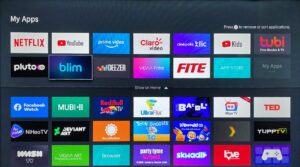
Yes, with the VIDAA App on your smartphone, you can easily install, uninstall, and manage apps on your TV. This provides greater flexibility and convenience when customizing your TV experience.
Cloud Gaming allows you to play over 1,000 games directly on your TV without the need for a console. You can access popular cloud gaming services through the VIDAA platform, using only a compatible controller.
VIDAA Art transforms your TV into a digital art gallery, featuring renowned artworks and personalized collections. You can easily customize display settings and choose from a diverse selection of art pieces. Access VIDAA Art via the dedicated app icon, the VIDAA Art button on your remote, or through the side menu under the Art icon.
VIDAA Kids powered by Kidoodle is a dedicated space designed for children, offering curated, child-friendly content along with robust parental controls. You can easily set restrictions, screen time limits, and monitor your child’s activity through the Kids settings. Access VIDAA Kids powered by Kidoodle via the VIDAA Kids app icon or through the side menu by selecting the Kids icon.